
Decision table example
Build a decision table for login and administrator access. Review true/false combinations and enter the expected action for each rule.
Build a decision table →- No account or installation
- Copy or download results
- Documents processed in your browser
File sizes and generation counts have limits. Check the limits shown in each tool.
Worked example · fictional specification
Build four rules for login and admin access
Assume that only a signed-in administrator can open the admin screen. Signed-out users see a login prompt; regular users are denied access.
1. Enter data
Signed in
Administrator
- Enter the two conditions on separate lines in Decision table.
- Generate the four rules, then enter the expected actions yourself.
- Fill every expected action, export CSV and run each rule with the corresponding test account.
2. Read the result
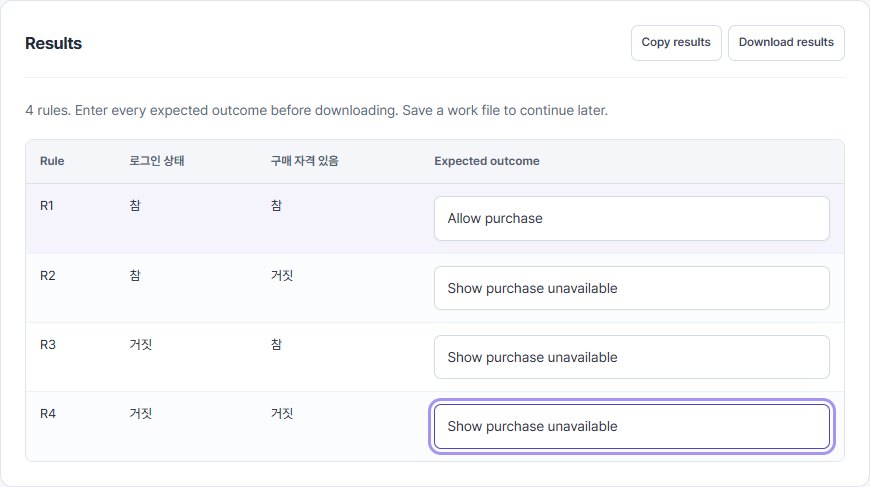
| Rule | Signed in | Administrator | Expected action to enter |
|---|---|---|---|
| R1 | True | True | Allow admin access |
| R2 | True | False | Deny access |
| R3 | False | True | Prompt for login |
| R4 | False | False | Prompt for login |
Swipe the table sideways to see all columns.
3. Use it in your tests
The tool creates the true/false combinations; you define the outcomes. The actions above were authored for this fictional specification. A signed-out/admin-true rule can help review inconsistent session and role states.
Limits and additional checks
Check direct URLs and API calls as well as screen navigation. Document a specification-based reason for unreachable states. The UI supports up to six conditions.
View the tool screen
Download the example table (CSV)Download the input example (TXT)
Written and checked against the tool by QA Workbench · 2026-10-14. Fictional inputs; this is not a record of tests run against a service.