
QA checklist example
Select a web QA checklist, edit or add checks, record confirmation and export CSV for your testing workflow.
Open checklist →- No account or installation
- Copy or download results
- Documents processed in your browser
File sizes and generation counts have limits. Check the limits shown in each tool.
Worked example · fictional specification
Prepare baseline checks for a registration page
Assume that you are preparing baseline checks for a registration page. The supplied list is a starting point, not a substitute for the specification or test results.
1. Enter data
Area: Web
Example: Refresh/back state → Check whether the registration inputs remain after navigating back
- Select Web in QA checklist.
- Edit the starting checks for your screen and expected behavior; add missing checks.
- Check only items you have reviewed, then export CSV. Record defects and evidence separately.
2. Read the result
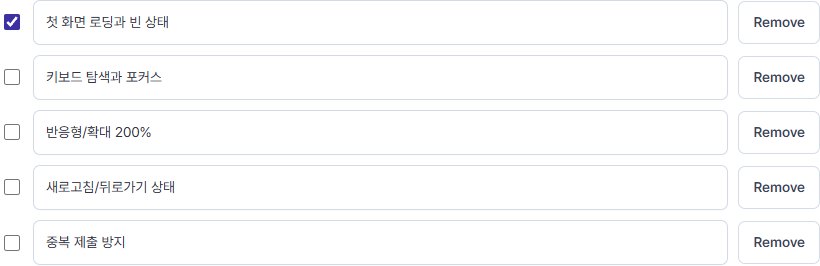
| Starting check (Korean tool output) | Confirmation |
|---|---|
| 첫 화면 로딩과 빈 상태 | Not checked |
| 키보드 탐색과 포커스 | Not checked |
| 반응형/확대 200% | Not checked |
| 새로고침/뒤로가기 상태 | Not checked |
| 중복 제출 방지 | Not checked |
Swipe the table sideways to see all columns.
3. Use it in your tests
A checkbox records confirmation, not a pass or an absence of defects. You may complete a check and find a defect; record the outcome and defect ID in your project records.
Limits and additional checks
Split checks requiring specific screens, browsers, accounts or prerequisites into concrete test cases. Completing the baseline list does not establish full coverage.
View the tool screen
Download the example table (CSV)Download the input example (TXT)
Written and checked against the tool by QA Workbench · 2026-10-14. Fictional inputs; this is not a record of tests run against a service.