
Generate and use diagnostic scripts
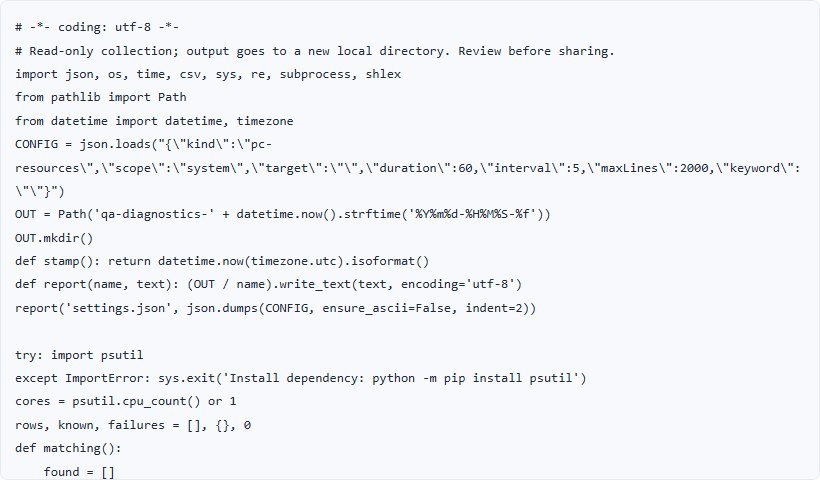
Create a Python script for PC CPU and memory collection. Configure the capture, prepare the runtime and review the resulting CSV.
Generate a script →- No account or installation
- Copy or download results
- Documents processed in your browser
File sizes and generation counts have limits. Check the limits shown in each tool.
Worked example · fictional specification
Prepare a 30-second PC resource capture
Assume a 30-second capture of system resources at five-second intervals. The website generates the script; it does not execute it on your PC.
1. Enter data
Purpose: PC CPU and memory
Language: Python
Scope: entire system
Duration: 30 seconds / Interval: 5 seconds
- Set the purpose, language, scope and capture timing in Diagnostic scripts.
- Generate the script, review its code and instructions, then download it.
- Prepare Python 3.10+ and psutil on the test PC, then run python collect_resources.py.
2. Read the result
| Item | Generated content or execution check |
|---|---|
| collect_resources.py | 설정한 시간·간격으로 수집하는 Python 코드 |
| 실행 안내 | Python 3.10 이상, psutil 설치 필요 |
| 실행 후 CSV | CPU·메모리 값과 측정 시각 확인; 사이트에서 실행한 결과가 아님 |
Swipe the table sideways to see all columns.
3. Use it in your tests
30 seconds and five seconds describe the capture settings. Actual row counts and timestamps depend on runtime behavior, so a fixed count is not guaranteed. Review the generated code and compare observations across periods.
Limits and additional checks
Resource collection does not produce an automatic pass/fail decision. App-specific, Android, log-file and Windows-event collection have different prerequisites and scopes. Review account/device information and log contents before sharing captured files.
View the tool screen
Download the example table (CSV)Download the input example (TXT)
Written and checked against the tool by QA Workbench · 2026-10-14. Fictional inputs; this is not a record of tests run against a service.