
Field test data examples
Generate data for a required numeric field. Distinguish omission, null, type mismatches and out-of-range inputs.
Generate field data →- No account or installation
- Copy or download results
- Documents processed in your browser
File sizes and generation counts have limits. Check the limits shown in each tool.
Worked example · fictional specification
Check omission, null and boundaries for age
age is a required number, does not accept null and includes both endpoints of 18–65. Define error messages and status codes from your service specification.
1. Enter data
Field: age
Type: number
Required: yes / Allow null: no
Minimum: 18 / Maximum: 65 / Step: 1
- Set the name, type, required/null policy and range as shown.
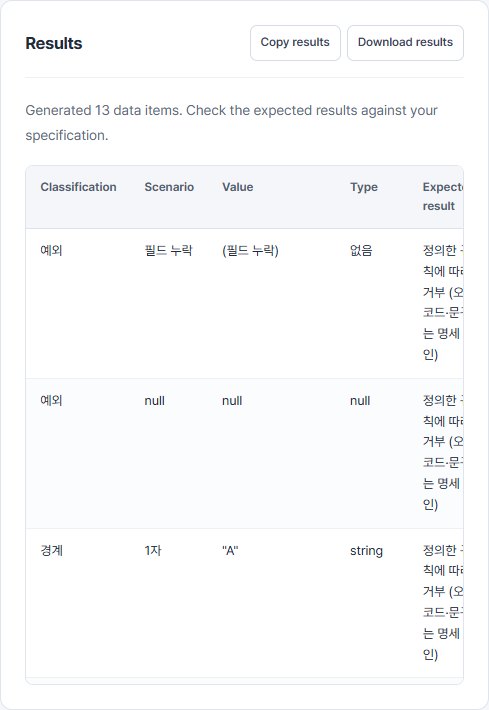
- Generate data and review its category, test perspective and request JSON.
- Apply one input at a time in your form or request body and record the observed outcome.
2. Read the result
| Perspective (Korean tool output) | Request JSON | Expected check (Korean tool output) |
|---|---|---|
| 필드 누락 | {} | 정의한 규칙에 따라 거부 (오류 코드·문구는 명세 확인) |
| null | {"age":null} | 정의한 규칙에 따라 거부 (오류 코드·문구는 명세 확인) |
| 숫자 범위 | {"age":17} | 정의한 규칙에 따라 거부 (오류 코드·문구는 명세 확인) |
| 숫자 범위 | {"age":18} | 추가 업무 규칙이 없다면 허용 |
| 숫자 범위 | {"age":19} | 추가 업무 규칙이 없다면 허용 |
| 숫자 범위 | {"age":64} | 추가 업무 규칙이 없다면 허용 |
| 숫자 범위 | {"age":65} | 추가 업무 규칙이 없다면 허용 |
| 숫자 범위 | {"age":66} | 정의한 규칙에 따라 거부 (오류 코드·문구는 명세 확인) |
| 범위 내 대표값 | {"age":41.5} | 추가 업무 규칙이 없다면 허용 |
| 빈 문자열 | {"age":""} | 정의한 규칙에 따라 거부 (오류 코드·문구는 명세 확인) |
| 숫자 대신 문자열 | {"age":"18"} | 숫자 타입 기준 거부. 자동 형변환 정책이 있다면 별도 검토 |
| 불리언 | {"age":true} | 정의한 규칙에 따라 거부 (오류 코드·문구는 명세 확인) |
Swipe the table sideways to see all columns.
3. Use it in your tests
{} omits age; {"age":null} includes it with a null value. {"age":"18"} uses a string instead of a number. Boundary rows contain both acceptable and rejected values, so read the expected outcome too.
Limits and additional checks
This numeric example does not enforce integer-only input. Add 18.5 separately if your service requires integers. Adapt string character/byte counts and email formats to the actual policy.
View the tool screen
Download the example table (CSV)Download the input example (TXT)
Written and checked against the tool by QA Workbench · 2026-10-14. Fictional inputs; this is not a record of tests run against a service.