
JSON Schema validation example
Validate a required integer age and its allowed range with JSON Schema. Read mismatch paths and understand unsupported rules.
Validate JSON structure →- No account or installation
- Copy or download results
- Documents processed in your browser
File sizes and generation counts have limits. Check the limits shown in each tool.
Worked example · fictional specification
Distinguish string "20" from numeric 20
age must be an integer from 18 through 65; additional fields are not permitted. Validation uses the rules supported by this tool.
1. Enter data
JSON value
{"age":"20"}

Schema
{
  "type": "object",
  "required": [
    "age"
  ],
  "properties": {
    "age": {
      "type": "integer",
      "minimum": 18,
      "maximum": 65
    }
  },
  "additionalProperties": false
}- Enter the JSON value and the expected schema in their respective fields.
- Validate the structure and read each mismatch path and reason.
- Replace "20" with numeric 20 and revalidate; then try an omitted field and an out-of-range value.
2. Read the result
| JSON input | Validation result (Korean tool output) |
|---|---|
| {"age":"20"} | $.age: "integer" 타입 필요, 실제 string |
| {"age":20} | 지원하는 규칙 범위에서 일치합니다. |
| {} | $.age: 필수필드 누락 |
| {"age":66} | $.age: maximum 위반 |
| {"age":20,"role":"admin"} | $.role: 추가필드 금지 |
Swipe the table sideways to see all columns.
3. Use it in your tests
$.age points to the age field. String "20" fails the integer rule; numeric 20 passes. Passing means the structure matches, not that registration or permission handling succeeded.
Limits and additional checks
Supported rules cover type, required, properties, items, enum, const, numeric/length/array-size limits and additionalProperties. $ref, format, pattern and anyOf are unsupported and reported as errors. Use a separate validator for full OpenAPI validation.
View the tool screen
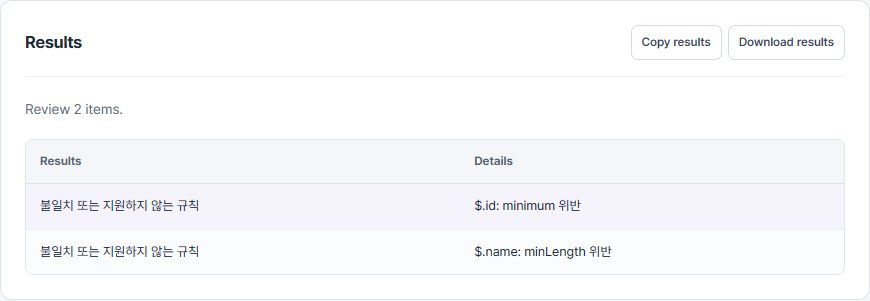
Download the example table (CSV)Download the input example (TXT)
Written and checked against the tool by QA Workbench · 2026-10-14. Fictional inputs; this is not a record of tests run against a service.